
Is your data ready for this AI use case?
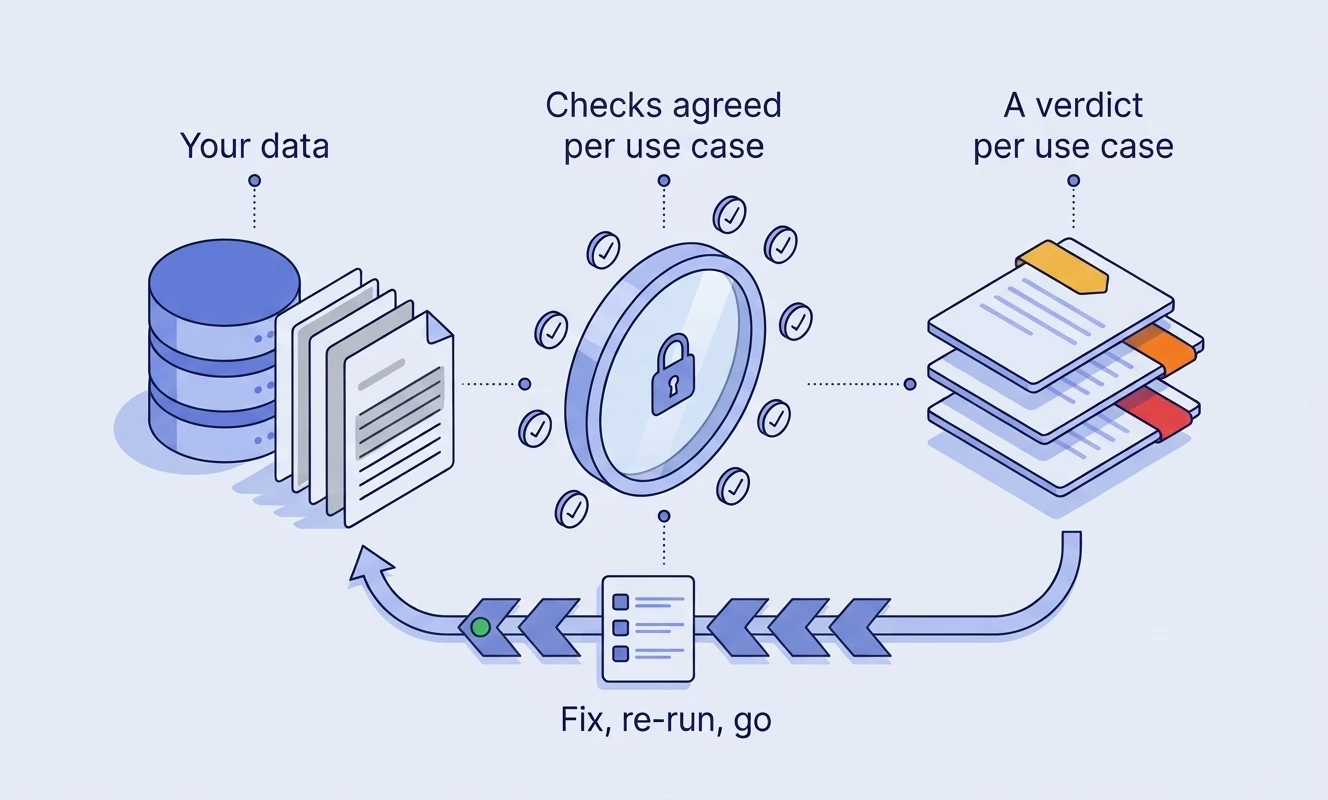
We run the checks that decide each AI use case you plan, in your own environment, and give each one a verdict: go, go with limits, fix first or no-go. Then we make the fixes and re-run the checks, so you see each verdict move.
The data looks fine until a model uses it
Dashboards and data quality scores rarely show the problems that matter to AI. These do.
A column that is 31% filled
Usually it is empty for years and full since a system migration. Averaged over the whole history it looks like a quality issue. To a model it is a cliff.
A description that is wrong
"Converted at the month's rate" when every row uses one fixed rate. A model trusts the description, and so does the person reading its answer.
Three columns called revenue
People know which one finance uses. A model writing SQL picks one, and gives a confident answer that does not match the board pack.
An answer the documents don't hold
A knowledge assistant can only cite what is there. If the policy is only in a scanned PDF or a two-year-old draft, it answers from the wrong one or makes it up.
Sharing nobody meant
A Copilot or Glean rollout searches everything a user can open. All-staff sites with contracts or personal data become answers.
Too little history to learn from
We ask for two years of the outcome a model predicts, so each season appears twice. Many teams find out they have eight months after the project has started.
A verdict per use case, not a score for your data
Before we connect to anything, we agree with you which checks decide each use case and the threshold for each one. The verdict follows from those checks, so you can see why it came out the way it did.
- Go Every agreed check passes. Build it.
- Go with limits Build it on stated terms, such as "answer delivery questions only on 2026 data, and say so", until the fix is done.
- Fix first Fixable problems stand in the way. The fix list says which, who owns each one and roughly how long it takes.
- No-go A blocker such as missing history that no pipeline fix brings back quickly. Better to know before the budget is spent.
- Not assessed A check we could not measure. A missing number never counts as a pass, and it never quietly counts as a fail either.
What you keep. The report, the fix list, draft data contracts for each use case, suggested dbt tests, and the exact SQL we ran.
Eight dimensions, checked against the use case
Checks come from a catalog for each kind of use case: questions over data, knowledge assistants, prediction, and agents acting on your systems. Each threshold records why it is where it is.
Can the data answer what the use case needs, across the history it needs, in every period and not just on average?
True descriptions, one definition per metric, declared joins, and which of several similar columns is the right one.
Disguised nulls such as "N/A", impossible values, duplicate keys, broken references and values that differ only by case.
Freshness against what the use case needs, failing pipelines and tests that have been quietly switched off.
An owner for what the use case reads, tests that fail when they should, and lineage you can follow.
Least-privilege roles for an AI system, broad grants, oversharing on document sites and an audit trail.
Personal data in columns and in free text, whether it is tagged, and whether the use case needs legal review.
Scans with no text, near duplicates, stale versions, hidden text, leaked secrets, and whether the answers are there to find.
You choose how much we read
The checks run as SQL inside your environment, under a read-only role you create. Every query is written to a file your security team can read. If nothing may leave, you run the kit in a container and send back a bundle you have checked first.
| Tier | What we read | What leaves your environment | Used in |
|---|---|---|---|
| Tier 0: metadata | Names, types, keys, owners, grants, dbt and document metadata. | Names and counts. | Snapshot |
| Tier 1: aggregates | Adds row counts, fill rates by quarter and broken references. | Aggregates. No rows. | Snapshot |
| Tier 2: sampling | Adds a random sample for the personal data scan, and reads documents in memory. | Match counts only. | Assessment |
| Tier 3: real questions | Your real questions, with answers your team agreed, go through a model you choose. | To the model: names, types, keys, descriptions, findings and the question. Never a row. | Assessment, where you agree |
Then we fix what stands in the way
The fix list becomes the plan. We take the fixes in the order that unblocks the most use cases, in the stack you already run, and re-run the checks to show each verdict move.
Fitness and delivery
Pipelines that hold their history
Recover history where a source still has it, add freshness checks that can fail, and alert someone when a feed stops.
Meaning
One definition per metric
True column descriptions, one written definition for each metric where people query, and a note on which of several similar columns is the right one.
Quality and ownership
Tests and contracts that fail when they should
Checks in the orchestrator you already run, data contracts for what each use case reads, and a named owner who can say yes to a change.
Privacy and rights
Personal data found and handled
Personal data tagged where it lives, free text included, and kept out of what the AI reads unless the use case needs it.
Access
Least privilege for AI
A read-only identity for each AI system, grants cut to what it needs, and oversharing on document sites closed before an assistant finds it.
Documents
Documents an assistant can trust
Scans put through OCR, one copy of each document, stale versions retired by their owners, and structure a retriever can use.
This is our data engineering practice, scoped from your fix list.
From verdict to a working use case
Readiness Snapshot: 3 to 5 days, fixed price
One use case, on metadata and aggregates only, so it clears procurement quickly. You get its verdict and the fix list. With no sampling and no model, a Snapshot can reach go with limits but not go, and we say so in the report.
Readiness Assessment: 2 weeks, fixed price
One to three named use cases, including documents and, where you agree, your real questions run through a model. A verdict on each, the ranked fix list, draft data contracts and dbt tests.
Data Foundation Sprint: 4 to 8 weeks, fixed price
Where the verdicts change. We make the fixes: pipelines, checks in the orchestrator you already run, contracts, personal data handling and document clean-up. We re-run the assessment at the end to show each verdict moving.
Build: once a use case can go
We build it on the terms its verdict set: a knowledge assistant, questions over your data, or a prediction, with our AI and GenAI team. For an agent that acts on your systems, we start with an Agent Reliability audit.
Readiness Retainer: monthly
A re-run each month, the verdicts that changed and what changed them. Pipelines drift, and a go from March is not a go in September.
Common questions
Does our data have to leave our environment?
Rows and document text stay put. What leaves depends on the tier you agree: names and counts, then aggregates, then match counts. At tier 3 a model you choose also sees table and column names, descriptions and findings, never a row. If even that cannot leave, you run the kit in a container and walk us through the report on a call.
Which warehouses and clouds do you work with?
On AWS: Athena over Glue catalogs and S3 Tables, and RDS or Aurora PostgreSQL. On Azure: Microsoft Fabric warehouses and lakehouses, and Azure Database for PostgreSQL. Also Google BigQuery, and PostgreSQL wherever it runs. Our engineers already build data platforms on AWS and Azure, so the read-only role, the network path and the cost guardrails are familiar ground. The first run on a new platform is a preview: your team sees every query, and on BigQuery the bytes each one would scan, before anything runs. For documents: SharePoint, or an export from any document library.
Do we need dbt?
No. dbt helps, because it holds tests, descriptions and lineage, but the kit reads keys, comments, tags and grants from the warehouse itself. The report says what it could not see without dbt.
We already have Purview or Unity Catalog. Isn't this the same?
Those tools report on your data. We decide whether a named use case can go ahead, which is the question a budget depends on. We import Microsoft's site permissions report rather than rebuilding it.
We are rolling out Copilot. Does this help?
Yes, it is one of the most common reasons to start. We look at what a knowledge assistant would read: oversharing on sites, personal data and secrets in documents, stale and duplicate versions, and whether the answers people ask for are there at all.
Does this help with the EU AI Act?
It produces evidence about data quality and governance that a compliance team can use, and flags use cases that may need legal review. It is not legal advice, and it does not make a system compliant on its own.
Who owns what at the end?
The report, the fix list, the contracts and tests we drafted for you are yours. Our tooling stays ours.
Do we have to use you for the fixes?
No. Each fix on the list has an owner and an effort estimate, and the draft contracts and tests are written for your team to pick up. If you would rather we did the work, that is the Data Foundation Sprint.
What happens after a no-go?
You find out before the build budget is spent, with the reason and what would change it. Sometimes that is a fix, sometimes a different use case on the same data that can go now.
Start with a Snapshot
In 3 to 5 days, on metadata and aggregates only, you find out whether one AI use case can go ahead on your data, and what stands in the way if it can't.