

Crossing the Rubicon: AI in Software Development
AI has changed how software gets built, and neither developers nor managers can go back to the old way. Here's what that means for both, the risks that come with it, and how to adapt.

· 14 min read
When Julius Caesar led his army across the Rubicon in 49 BC, he committed to a war he could not walk back from. Software development has reached a similar point with AI. Norms, timelines, and competitive expectations are being reset, and companies can no longer treat AI as a trend they may opt out of. It changes how software is designed, built, and maintained.
A development team that has felt the productivity gain from AI-assisted coding will not willingly return to doing everything by hand. A management team that has seen features ship faster will not accept the old timelines again. The die is cast.
This post looks at what that point of no return means for developers and for management: how the developer’s role changes, what the productivity numbers actually say, how the change spreads across the industry, and which risks come with depending on AI. It ends with practical strategies for both groups and an anticipated adoption timeline.
The Developer's New Reality
For developers, the move to AI-driven development changes both the job and the career. It brings real opportunity and some less obvious peril: AI makes developers more productive, and it can also wear down the engineering skills they depend on. This section covers both.
The Shift in Developer Identity
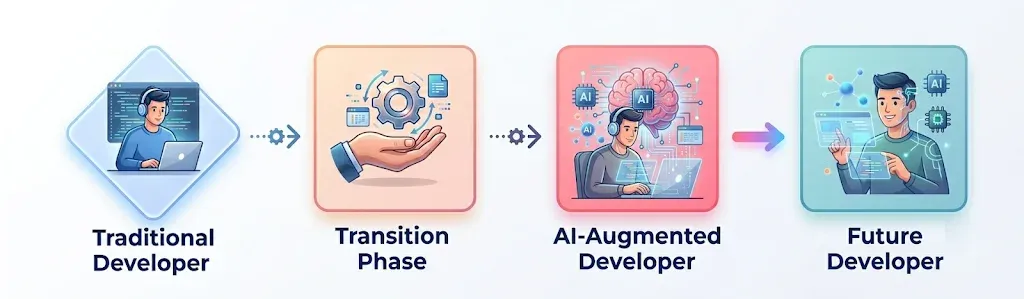
Adopting AI changes what a developer spends the day doing. Less time goes into writing code and more into designing solutions and checking what the AI produced. Once a developer has seen AI speed up a complex implementation or untangle a hard bug, going back to the old way feels slow to the point of being unthinkable.
What drives the change
- Lower cognitive load. AI changes how much mental effort developers expect a task to take. Once they no longer have to memorize syntax or type boilerplate, few will choose to carry that load again.
- Speed as the new baseline. GitHub reports that developers complete tasks 55% faster with Copilot. Once a team works at that pace, it becomes the expected pace.
- Competitive pressure. McKinsey’s research found that AI can raise developer productivity by up to 50%. Developers who refuse AI assistance risk falling behind a market that won’t wait for them.
- A one-way change in skills. The move from “code writer” to “AI orchestrator” does not reverse. As developers get used to working with AI, writing everything by hand starts to feel primitive.
The Hidden Dangers of This Shift
Developer “Brain Rot”
Developer brain rot, the decline in skills that comes from leaning on AI, may be the hardest consequence to notice. METR’s study found that experienced developers were 19% slower with AI, yet they grew more dependent on it. Some people now struggle to write an email without ChatGPT, and some developers find it increasingly hard to code without an assistant. These are the symptoms to watch for:
The Brain Rot Symptoms in Developers
- Weaker problem solving and reasoning. Developers lose the ability to reason about a system at different levels. At the macro level (system design), they struggle with greenfield work and can’t design data schemas, component boundaries, or API contracts without an AI template. At the micro level (code logic), they lose the habit of running code in their head: picturing the call stack, tracking state, predicting edge cases. Without that, they can’t debug a race condition or a performance bottleneck, and they become prompt engineers who can’t work without an AI co-pilot.
- Syntax amnesia. Basic syntax and standard library functions start to feel foreign. A developer might struggle to write a
for-loopor a file I/O operation without autocomplete. The cost goes beyond memory: without fluency, it is hard to write efficient, idiomatic code, and the resulting subtle bugs and performance problems may slip past the AI too. - Context blindness. Developers see the function but not the architecture, the code but not how it talks to the database or the network. AI’s line-by-line help encourages that narrow view, which raises the risk of security holes, performance problems, and architectural debt.
- Code reading atrophy. Developers lose the patience and skill to read a large, unfamiliar codebase by hand. That skill is what lets someone join a new project, debug a legacy system, or analyze an architecture in depth. Without it, developers adapt more slowly and the organization struggles to maintain the software it already has.
- Creative stagnation. AI models are good at matching patterns in existing code, so they steer developers toward well-worn solutions. That discourages the lateral thinking behind algorithmic breakthroughs and elegant, non-obvious designs, and the result is a lot of code that looks the same.
Career Stagnation and Skill Gaps
A developer who leans on AI for core tasks can end up skilled at prompting particular tools while missing the fundamental, transferable engineering skills. If the tools change, that career can stall.
Security and Accountability Blindspots
Accepting AI-generated code without careful review can let in subtle but serious security vulnerabilities. The developer is still accountable for those flaws, whoever or whatever wrote the code.
The Management Shift
For leadership, AI in software development is a business change as much as a technical one. It changes how the organization competes, how it builds products, and where its money goes. Faster timelines and lower costs are a real opportunity, and they bring new strategic risks with them. This section covers the business effects that can’t be undone and the decisions leaders now have to make.
The Irreversible Business Impacts
- Economics. Once AI has reduced development costs, shareholders will not accept a return to the old expense levels. And when competitors ship features significantly faster, going back to old timelines means risking irrelevance.
- Customer expectations. Users come to expect rapid releases, near-real-time bug fixes, and constant polish. The AI-enabled pace becomes the minimum, and falling behind it costs trust and customers.
- Investment and lock-in. AI tools bring switching costs: vendor contracts, integrations, data pipelines, workflow changes, governance, and training. Having paid them, an organization is committed to its AI strategy.
- Talent expectations. Most developers now expect AI tools as standard equipment. A company that doesn’t provide them will have a harder time hiring and keeping people.
Critical Management Decisions Post-AI Integration
After adopting AI, several planning decisions change for good:
- Headcount. Instead of hiring more developers for more work, companies hire fewer people who are skilled with AI. The question becomes how well the team uses its tools, not how many people it has.
- Pace and quality standards. Management has to set new performance benchmarks. The AI-accelerated pace becomes the minimum for project timelines, and the lower AI-assisted error rate becomes the quality baseline leaders answer for.
- Speed of innovation. Teams can prototype and change direction much faster, so leaders have to decide faster too, both to take opportunities and to stop spending on dead ends.
- Technical debt. Management takes on a new kind of risk: governing systems whose complexity is managed by AI. Deciding to trust the AI becomes a lasting strategic commitment.
- Budget. Money that used to pay a large team’s salaries now pays for AI tools, infrastructure, and training, and that split becomes a permanent part of the budget.
The Cascade Effect: How AI Creates Irreversible Industry Changes
The effects don’t stay inside one company. Each organization’s decisions are like a stone dropped into a lake, and the ripples spread. As more organizations cross their own Rubicon, their combined choices change the whole industry, and the old competitive rules stop applying.
The diagram below shows how that chain reaction unfolds.

Some of the changes already under way:
- Client expectations. Clients who have seen AI-accelerated projects expect the same speed from everyone, which sets a faster baseline for the whole market. PwC’s survey shows most tech leaders integrating AI, so this change in market standards looks permanent.
- Education. Universities and training programs are redesigning curricula to treat working with AI as a core skill. The Stanford AI Index 2025 notes a surge in AI-focused programs, and new graduates arrive expecting and relying on AI tools.
- Open source. Projects built with AI help can become too complex for developers without similar tools to contribute to, which opens a lasting capability gap in the ecosystem.
- Documentation. Developers increasingly ask AI to explain a codebase on the spot instead of reading static, human-written documents, which makes the old documentation methods less relevant.
- Legal and compliance. Once AI is the industry norm for tasks like security analysis or bug detection, not using it can look like negligence, and a company may be liable for problems an AI could have caught.
- Investment. Investors are betting on an AI-native future. Dealroom.co reports that venture capital and valuations now lean heavily toward companies that use AI well, so companies that don’t find it harder to raise money.
New Fault Lines: Systemic Risks of the AI Transformation
AI-driven development is fast, and it carries risks that are easy to miss. These are not small issues to patch later; they come built into the way AI-assisted development works. The companies that do well will be the ones that spot these risks early and deal with them before they take hold.
New Vulnerabilities
Some of the vulnerabilities AI-assisted development brings into the software ecosystem
Supply Chain DependenciesAI-generated code creates opaque dependencies that traditional security scanners can’t fully analyze. A Veracode report describes new vulnerability patterns in AI-assisted code and found that AI-generated code introduced security vulnerabilities in 45% of cases. This paper goes deeper. | |
Adversarial ExploitationAttackers increasingly target the AI models used in development, poisoning training data or exploiting model behavior to slip in vulnerabilities. Prompt injection can trick a model into writing malicious code, and poisoned datasets can plant subtle errors or backdoors. Both the Veracode report above and this post cover it. | |
Hallucination DebtModels sometimes produce false patterns or wrong solutions that spread quietly through a codebase. Flawed logic, dependencies that don’t exist, and code that compiles but does the wrong thing all add up to technical debt that is hard to trace, and over time it makes software brittle and expensive to maintain. | |
Regulatory LagAI-generated code is evolving faster than the laws and compliance frameworks that apply to it, which leaves lasting legal gray areas. That lag makes accountability for vulnerabilities in AI-produced code unclear. The EU AI Act is also worth reading. | |
Quality ParadoxAI tools catch common syntax errors well but often introduce subtler bugs, such as logic errors or wrong assumptions about the application’s context. Because AI-generated code looks polished, human reviewers can miss them. |
The Great Homogenization
Relying on AI pushes the industry toward the same tools, techniques, and solutions
Code ConvergenceModels trained on similar data produce similar solutions, repeating the most common patterns. Codebases become more predictable and less inventive, with fewer alternative approaches to a problem. | |
Innovation BottlenecksAI suggestions favor efficient, familiar patterns over new ideas. Developers who rely on them explore less deeply, so existing approaches get reinforced instead of challenged. | |
Cultural FlatteningAs AI standardizes development, each company’s own coding culture and practices fade, usually toward the norms most common in the training data. Global teams can lose context-specific knowledge along the way. | |
Knowledge MonopoliesA handful of AI providers control the datasets, models, and infrastructure behind most programming help. That concentration of power is hard to reverse and can shut smaller players out. |
Thriving in the Post-Rubicon World
Adopting AI-driven development has its problems, but adoption is inevitable, and the organizations and people who adapt will find plenty of opportunity on the other side. Resisting won’t help. What helps is deliberately changing roles and responsibilities, for individual developers and for the organizations they work in, so the risks are managed and the benefits are realized.
Before the strategies, it’s worth looking at why people resist in the first place.
The Four Idols of AI Resistance: A Baconian View
This kind of resistance is old. More than 400 years ago, in his Novum Organum, Francis Bacon described the mental habits that stop people from accepting new truths. He called them the “Four Idols”, and they fit today’s resistance to AI in software development remarkably well:
- Idols of the Tribe (human nature). The limits of human thinking that make us trust intuition over measurement. Here it shows up as the belief that code quality tracks the effort spent writing it: the developer who insists hand-written code is better and ignores evidence of AI’s efficiency because using AI doesn’t feel like real work. Add availability bias (one AI failure gets remembered more than many successes) and confirmation bias (collecting the examples where AI did badly), and the barrier to adoption gets high.
- Idols of the Cave (personal biases). A person’s own attachments to their way of working, including the endowment effect (“my way is worth more because it’s mine”) and Not-Invented-Here syndrome. This is the senior engineer whose identity is so tied to pre-AI craftsmanship that AI feels like a threat to their personal “cave” of expertise.
- Idols of the Marketplace (confusing language). Vague terms that muddle reasoning. Endless debates over whether AI “understands” code or “pattern matches”, or whether it is “creative” or “derivative”, hide the practical question: does it produce working, maintainable software? Arguing over words gets in the way of measuring results.
- Idols of the Theater (dogma). Loyalty to established systems and philosophies, such as traditional development lifecycle models that weren’t designed for the speed and scale of AI-native development.
Bacon’s remedy was to replace comfortable assumptions with systematic observation. For AI, that means measuring actual outcomes, such as deployment frequency, bug rates, user satisfaction, and delivery speed, instead of defending ideals about what “good development” should look like. It calls for what Bacon called “true induction”: try AI tools carefully, measure the results, and drop cherished beliefs when the evidence contradicts them.
Strategies for Developers
Developers who adapt will do better than developers who resist. These strategies help:
Partner with AI as a Collaborative (Junior) Team Member
Treat AI tools as dependable assistants for routine work like boilerplate code or documentation, and review and refine what they produce so it meets the project's quality standards and requirements.
Maintain & Strengthen Core Engineering Skills
Stay sharp in system design, debugging, testing, security, and performance optimization, the areas where AI tools still fall short. Those skills are what keep a developer hard to replace.
Learn & Grow with AI
Use AI as a tutor rather than a shortcut. It can walk you through a new language, technique, or problem-solving approach, explain hard concepts, and answer questions as they come up. Used thoughtfully, it deepens your understanding and speeds up your learning.
Critically Evaluate & Improve AI Outputs
Make a habit of testing AI-generated code, understanding its logic, and improving it for performance or clarity. Junior developers in particular should be able to explain AI-assisted solutions in code review, which shows and builds their understanding.
Balance AI Assistance with Hands-On Practice
Code without AI regularly to keep your problem-solving skills and intuition sharp. That practice is what keeps you fluent and confident.
Develop AI Literacy and Prompt Engineering
Learn to write precise prompts that get relevant, high-quality output, and learn where AI is limited or biased. Together, those skills let you use AI tools well and make informed decisions about their output.
Leverage Mentorship and Pair Programming
Work with more experienced colleagues to learn how to use AI responsibly, where its blind spots are, and how to read its output correctly. Mentorship and pair programming spread that knowledge faster than learning alone.
Stay Informed & Continuously Upskill
AI tools change quickly. Keep up with them and keep refining your skills so you can use each improvement as it arrives.
Strategies for Organizations
Organizations need to adapt as well, with deliberate choices about risk, structure, and culture:
Redefine Leadership Roles as AI Orchestrators
Expect leaders to coordinate how people and AI work together. Give them the skills and the mandate to drive adoption, help teams redesign workflows, and keep AI use aligned with the company's strategy and business goals.
Reshape Organizational Structures & Empower Managers for AI-Driven Agility
Move toward flatter, more agile structures (such as diamond or hourglass models) that pair specialized leadership with capable, AI-augmented frontline teams. In this model managers drive the change: they guide adoption, address people's concerns, and redesign workflows for efficiency. Building managers' expertise in specific AI-heavy areas and equipping them to make data-driven decisions gives the organization both agility and leadership depth.
Integrate AI Seamlessly into Workflows and Tools
Put AI inside the systems and processes people already use, so it feels like part of the work rather than an extra step, and adoption follows faster. AI assistants in CRM, HR, collaboration, and knowledge systems can take over repetitive tasks, surface information in real time, and support better decisions.
Create Robust Governance and Ethical AI Frameworks
Set up AI Centers of Excellence (CoEs) to make sure AI is used responsibly across the SDLC. These teams, drawing on engineering, product, security, and compliance, should set clear rules for data governance, model versioning, IP protection, and the ethical use of AI coding tools. Governance also has to cover practical risks: AI-generated code must meet quality and security standards, open-source components must not be used without a license, and people must stay accountable for critical design and deployment decisions.
Build a Comprehensive Upskilling and AI Literacy Program
Train people at every level in technical fluency, ethical awareness, and critical thinking about AI. Back it with clear, honest communication that presents AI as a way for roles to grow, augmenting what people can do and opening new career paths, rather than as a way to replace jobs. GenAI tools can also personalize the training itself through skill-gap analysis, tailored learning paths, and targeted coaching.
Cultivate Culture of Experimentation
Encourage teams to try AI tools, adjust their workflows, and keep improving as the tools get better. Teams that experiment stay adaptable, accept changes to their roles more easily, and treat AI as a collaborator.
Reinvest Time for Innovation & Growth
Time saved through AI (faster coding, testing, and documentation) should be reinvested deliberately. Put the freed capacity into hard problems, product innovation, and new market opportunities.
The Future is Here
The Rubicon has been crossed, and there is no ferry back. This is not a passing disruption. It is a lasting change in how software is built and maintained everywhere.
Earlier this year, Microsoft announced that AI coding assistants write around 30% of the code at Microsoft, and Google shared similar figures. Efficiency and productivity gains currently sit at around 20% to 30%.
Based on the sources cited earlier, here is an anticipated timeline of AI adoption in software development, from early adoption to a point where “AI-native” is simply the standard.
The Timeline of AI-Driven Software Development

Conclusion: Iacta Alea Est: The Die Is Cast
As he crossed the Rubicon, Caesar reportedly said “Iacta Alea Est”: the die is cast. For software development, the die was cast when AI showed it could write, debug, and optimize code faster than people. Whether to adopt AI is no longer the question. Market forces and competitive pressure have already answered it.
For developers, AI is an opportunity to move from writing code to designing complex, AI-assisted systems and making higher-level decisions about architecture, system design, and AI integration.
For management, the advantages that come from adopting AI today will be the minimum needed to compete by the end of the decade. Companies that don’t commit fully will find it harder and harder to keep up.
What remains open is how quickly you adapt. The developers and companies that accept the change and position themselves for it will do well in the post-Rubicon era of software development.